photo of anthony pellicone in front of a classroom of adult learners

Anthony Pellicone, a graduating senior in Computer Science, has made a remarkable impact at URI Information Technology Services since joining the team in fall 2024. In just a few semesters, his contributions have touched nearly every corner of ITS, from flagship platform deployments to foundational infrastructure improvements.
Anthony played a central role in the initial rollout of LibreChat, URI’s generative AI chat platform, and has continued to support its growth through ongoing updates and operational maintenance. The platform now serves nearly 1,000 users and processes more than 5,000 messages per week, reflecting both its value to the URI community and the reliability of the work behind it.

One of his most significant technical contributions was co-authoring a complete rewrite of the process that synchronizes user accounts from PeopleSoft into downstream systems, including Active Directory, Google, Single Sign-On, and Brightspace. The previous process took up to 12 hours to run, could only execute once per day, and left users waiting as long as 48 hours to see changes take effect. The new system completes in minutes. Launched in January 2025, this improvement translates to an estimated 120,000 fewer hours of cumulative end-user waiting per year.

What sets Anthony apart is not only the scale of his technical work, but how he approaches it. He is known for his professionalism, clear communication, and genuine approachability—equally at ease debugging complex systems and explaining them to non-technical colleagues. He also supported users navigating generative AI tools and co-led a workshop for the Osher Lifelong Learning Institute (OLLI), where he answered questions on cybersecurity and password management in the age of AI.

“My work with ITS at URI has exposed me to a variety of opportunities and interesting projects. Collaborating with supervisors and receiving feedback has given me invaluable insight into what it means to be an effective team member and make meaningful contributions. The freedom to experiment with different technologies, explore modern tools, and research best practices has greatly improved my problem-solving skills and my ability to adapt to new challenges.”
Anthony Pellicone


After graduating in May, Anthony will continue at URI through the Cybersecurity ABM program. ITS wishes him well and looks forward to seeing what he accomplishes next.

Chi Shen
Primary Supervisor, Associate Director of Cloud and IT Infrastructure

Karen Lokey
Associate Director of Innovation

sparkle icon to indicate generative AI

The University of Rhode Island Information Technology Services (URI ITS) provides support and guidance for the effective and responsible use of generative artificial intelligence (AI) tools across teaching, research, and administrative work. Our goal is to help faculty, staff, and students use AI to enhance productivity, creativity, and learning while maintaining ethical and secure practices.

Our approach emphasizes accessibility, data protection, and informed use. Through training, resources, and community engagement, we help users understand both the potential and limitations of AI technologies.

By providing structured guidance and fostering responsible innovation, URI ITS empowers the university community to integrate generative AI thoughtfully—enhancing collaboration, efficiency, and discovery across disciplines.

Executive Lead

Karen Lokey

Technical Lead

Karen Lokey
karen_lokey@uri.edu

Support Team

ITS Innovation

About the Service:

Features

Generative AI refers to technologies that create new content—such as text, images, and data visualizations—based on patterns learned from large datasets. Unlike search engines, which retrieve existing information, generative AI produces original responses. Because these outputs are newly generated rather than sourced from specific references, users should always evaluate them critically before use.

Finding URI AI Tools

You can easily explore approved Generative AI (GenAI) tools available to you based on your role at the University of Rhode Island. 

  1. Go to: https://its.uri.edu/services/
  2. Browse or sort services:
    • Use the A-Z option if you are looking for a specific service by name.
  3. Filter by role:
    • You can also select your role (for example, faculty, student, or staff) to see tools and services relevant to you. 
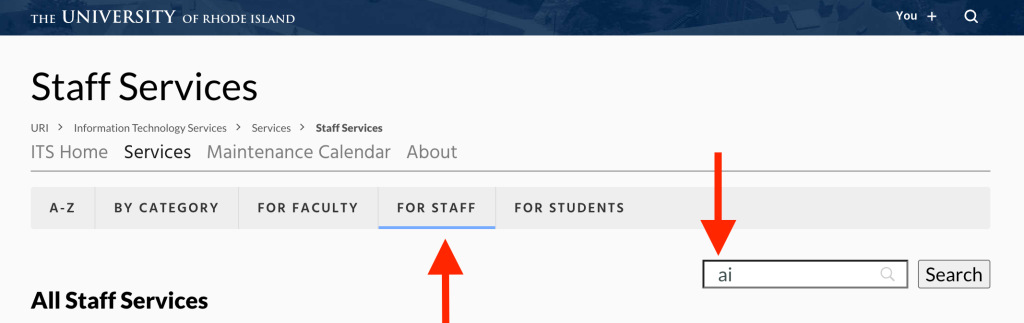
a filter selecting "for staff" and listing "ai" in the search window
  1. Search for AI tools: 
    • Within your role, use the search bar to type “AI.” 
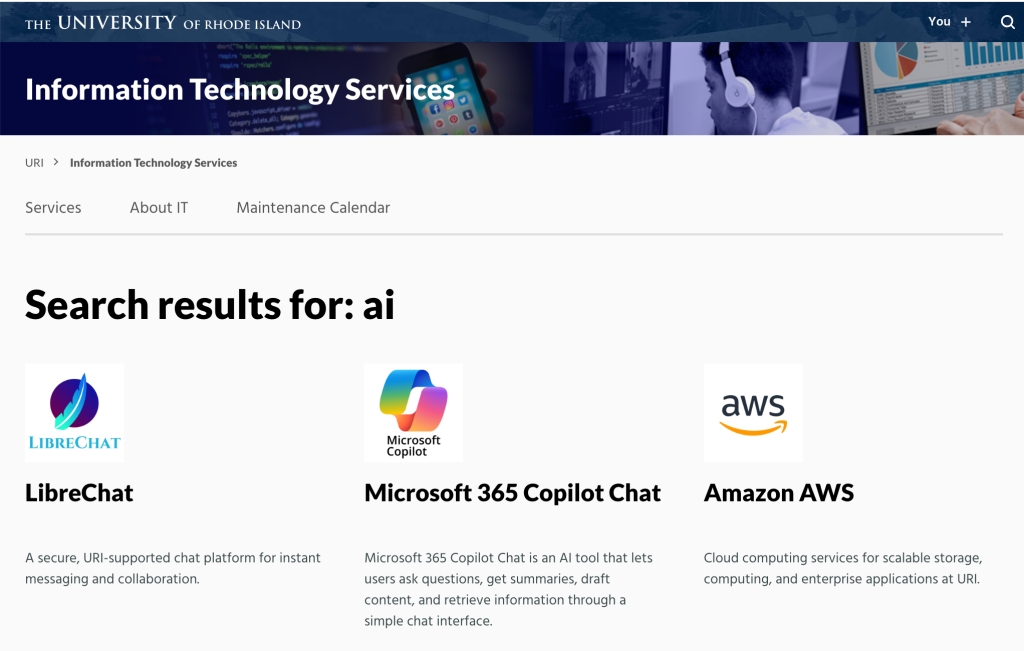
    • This will display service pages for AI-related tools vetted for use at URI. 
  2. View details: 
    • Click on the service name to open its page. 
search result for AI tools showing links to LibreChat, Microsoft 365 Copilot Chat, and Amazon AWS

Each page includes details about the tool’s features, access instructions, and available support and training resources.

Support and Training

Training resources are available in several formats. Documentation and guides can be found on individual support pages, and a variety of workshops are offered across campus throughout the year. These sessions focus on practical skills and real-world examples of how AI can assist with teaching, research, and administrative work.

We also share use cases, which are simple examples of how generative AI can help accomplish specific goals, such as improving writing, analyzing data, summarizing content, or generating new ideas.

Resources:

From Ideas to Impact: A Collaborative AI Strategy Session with robot

On August 19, leaders from the University of Rhode Island—including senior administrators, IT professionals, and business unit representatives—gathered for a half-day strategy session focused on Artificial Intelligence (AI) and its role in advancing URI’s mission. The session, From Ideas to Impact, featured Mary Strain, Amazon Web Services (AWS) leader for AI and Machine Learning in Education. With over two decades of experience bridging technology and education, she helped spark a practical, forward-looking conversation.

Key highlights and outcomes

  • Shared vision: Participants connected AI opportunities directly to URI’s mission, identifying ways AI can enhance teaching, research, and operations—all while aligning with institutional values.
  • Real-world use cases: During collaborative working sessions, teams developed high-impact, URI-specific AI concepts—from increasing student engagement to strengthening data-informed decision-making.
  • Cross-campus collaboration: Faculty, staff, and administrators made new connections across disciplines, laying the groundwork for a unified AI strategy.

A shared realization

Attendees shared realizations that highlighted both the potential and the practicality of AI at URI. Learning from use cases at other institutions sparked creativity and confidence. Reflecting on URI’s own data—what it is and where it resides—emerged as a key first step in realizing long-term value.

Examples from the community

Participants shared examples of how AI is already creating value at URI:

  • One director shared how his team uses AI to convert customer conversations into functional requirement documents and automate standard documentation—saving hours of manual work.
  • A faculty researcher explained how AI tools help him write, verify, and refine code—accelerating research workflows.

Looking ahead

This session marks the beginning—not the end—of a campus-wide AI initiative. Grounded in shared insights and practical examples, it represents a key milestone in URI’s thoughtful approach to AI: collaborative, mission-aligned, and responsibly implemented. With clear priorities and growing engagement, URI is well positioned to turn ideas into measurable outcomes. The next steps will be shaped by our collective creativity, commitment, and action.

Recent news about a legal decision involving The New York Times and OpenAI offers a timely reminder for all of us: be intentional with the information you share when using artificial intelligence (AI) tools such as ChatGPT. 

The New York Times recently secured a court order requiring OpenAI to retain ChatGPT logs that users had deleted. While this legal outcome is unlikely to significantly change the broader AI safety landscape, it underscores a critical point: What you enter into AI platforms may not be fully erasable. 

What Does This Mean for You? 
When using AI tools: 

  • Avoid entering sensitive or confidential information unless you are confident it is safe and appropriate to do so.
  • Assume persistence: Even if a platform offers deletion options, there may be circumstances where the data is retained or recoverable.  
  • Stay informed about your organization’s guidance, privacy policies, and best practices when using generative AI tools in your work or studies. 

Helpful Links 

If you have questions or would like guidance on responsible AI usage, please visit the Responsible Use of AI at URI resources page. 

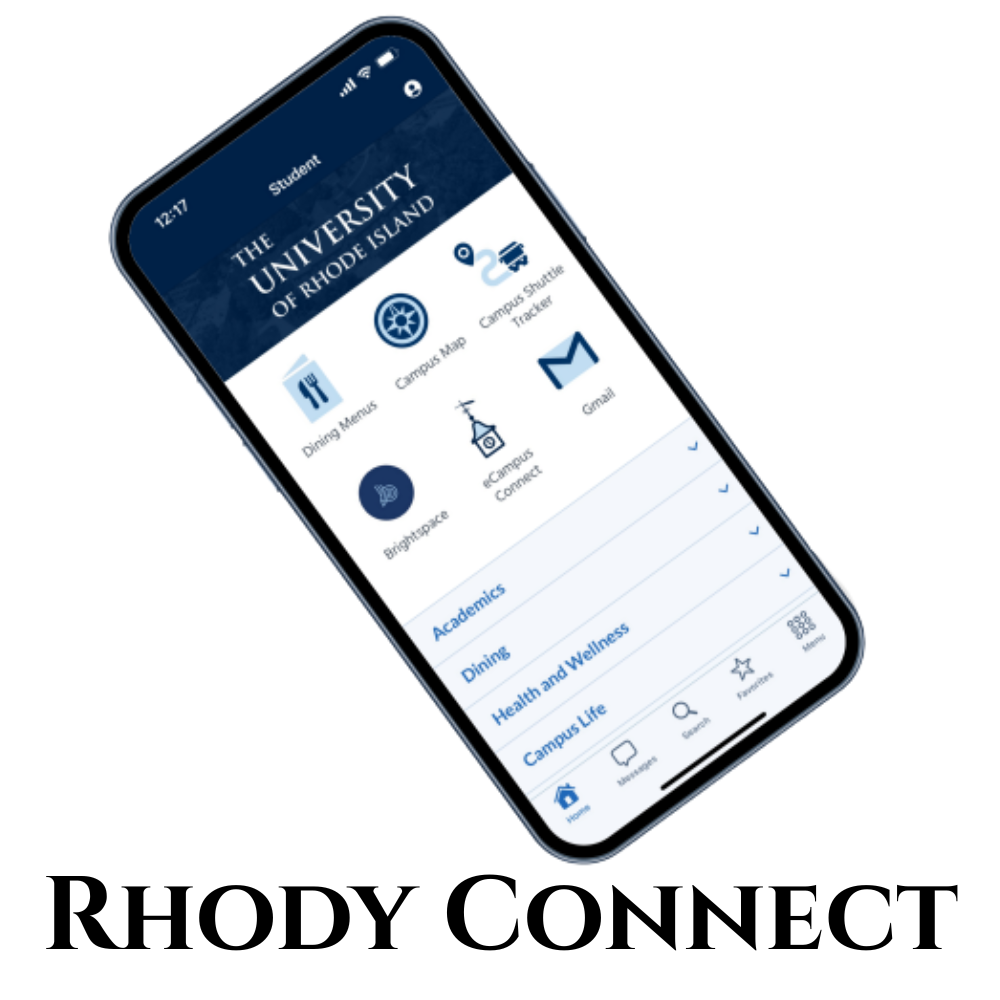
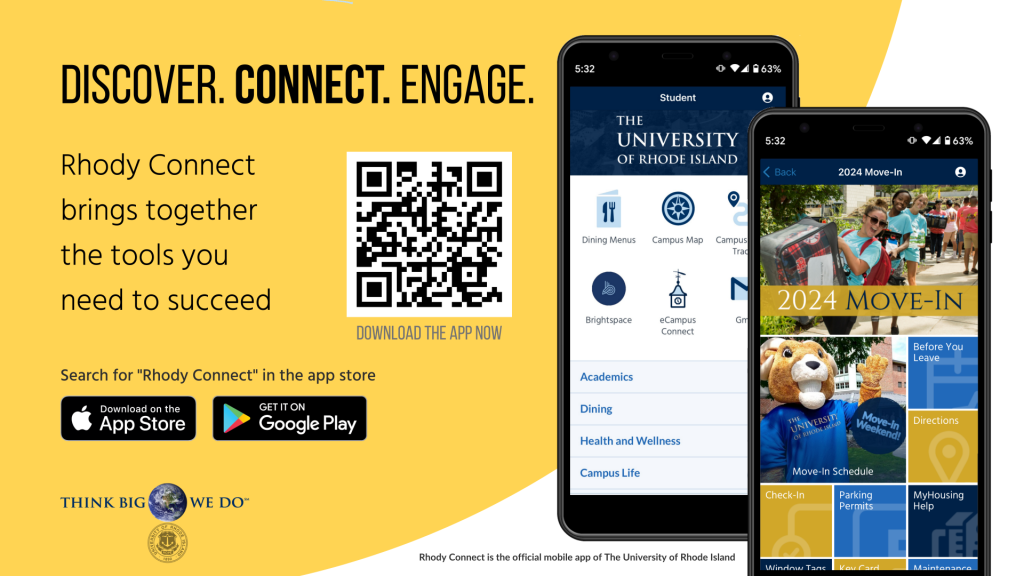
Rhody Connect with image of phone and app icons

Rhody Connect is the official mobile app of the University of Rhode Island, offering an all-in-one experience for students, faculty, staff, alumni, and visitors. Available on Apple and Android devices, the app provides seamless access to university tools and information through a personalized, mobile-first interface.

With URI Single Sign-On (SSO), users can log in once to access key campus systems like Brightspace, Gmail, and Starfish. The app also includes real-time campus info, transportation tools, maps, event details, and more.

If you’d like to request a new module or contribute content to the app, see the contribution guidelines.

Executive Lead

Cathy White

Technical Lead

Cathy White
cathywhite@uri.edu

Support Team

ITS Innovation

About the Service:

Features

  • Access Brightspace, Gmail, Starfish, and your Virtual ID card via SSO
  • View shuttle routes and live bus locations
  • See daily dining menus and dining hall camera feeds
  • Order food with your Virtual ID
  • Search campus directories
  • View and manage your Ram Account balance
  • Use the interactive campus map with accessibility details
  • Schedule curb-to-curb rides with Rhody Safe Rides
  • Get alerts and campus news
  • Track URI Athletics and Club Sports
  • Stream Ryan Center events or purchase tickets
  • Access Handshake job listings
  • Submit maintenance requests

Access

Get the App
Rhody Connect is available for download on Apple and Android devices. Click the appropriate link below to download the app directly to your mobile device.

Apple App Store Logo
Get it on Google Play

Support and Training

Feedback

Help us improve Rhody Connect!
Email suggestions to urimobile@uri.edu or fill out our feedback survey.

Available Knowledge Base Articles:


new application with icon of two people high fiving and a lightbulb above them

The ITS Innovation team collaborates with faculty and staff to develop and implement new applications that enhance student success and support university goals. From introducing cutting-edge classroom technologies to creating engaging mobile applications, the team is dedicated to delivering innovative technology solutions that meet the needs of today’s modern student.

ITS Innovation Team

Executive Lead

Karen Lokey

Technical Lead

Karen Lokey
karen_lokey@uri.edu

Support Team

ITS Innovation

Get Help

To learn more about the ITS Innovation team or to request a consultation for new application development, contact the ITS Service Desk.

To support learning outside of the classroom, URI has partnered with Instructure’s Parchment Digital Badges to provide digital badging for faculty, staff, and students. Digital badges are web-enabled credentials that recognize achievements, content mastery, or new skills through non-academic micro-credentialing. These badges contain rich metadata that validates and verifies the learning outcomes they represent, offering a secure and portable way to showcase accomplishments.

Executive Lead

Karen Lokey

Technical Lead

Catherine White
cathywhite@uri.edu

Support Team

ITS Innovation

About the Service:

Features

  • Metadata-Rich Badges: Includes issuer details, criteria, evidence, associated standards, and expiration dates.
  • Real-Time Verification: Ensures credentials cannot be tampered with and are instantly verifiable.
  • Parchment Digital Badges Pathways: Design stackable, cross-disciplinary learning pathways incorporating prior assessments and external certifications.
  • Digital Backpack: Provides a free, secure space to share badges via LinkedIn, social media, email signatures, and resumes.
  • Employer Integration: Offers immediate access for employers to validate skills and accomplishments.

Access

Issuer Accounts:

  • URI departments can request accounts for non-academic credentialing.
  • Email the ITS Service Desk to set up an issuer account.

Digital Badges:

  • Badges are issued after participants meet specific learning outcomes or demonstrate mastery of skills.
  • Use Parchment Digital Badges for creating and issuing badges.

Explore Tools:

Visit the Parchment Digital Badges and URI’s Digital Badging Homepage to learn more.

Support & Training

Resources:

    For questions about digital badging or to request a consultation, contact the ITS Service Desk or the ITS Innovation team.

    LibreChat Logo

    LibreChat is a pilot program making generative AI easy and accessible for the URI community. Whether you’re brainstorming, creating content, or simplifying tasks, LibreChat brings powerful AI tools together in one easy-to-use platform.

    You can choose from a variety of large language models – tailored for everything from creative projects to data analysis to idea exploration.

    Want to try LibreChat? If you’re not already enrolled, you can request access using the steps outlined in the Access tab on this page. By using this service, you agree to the Terms of Use.

    Executive Lead

    Karen Lokey

    Technical Lead

    Chi Shen
    cshen@uri.edu

    Support Team

    ITS Innovation

    About the Service:

    Features

    • Easy to Use: The platform is designed to be simple and straightforward, so anyone can start using generative AI without needing technical skills.
    • Multiple AI Options: You can pick from different top AI tools, like those from OpenAI, depending on what you need—whether it’s writing help, creativity, or research.
    • Personalized Experience: Adjust settings and add features to make LibreChat work the way you want.

    Access

    Note: Use of LibreChat requires acceptance of the Terms of Use. Please review the terms before requesting access.

    Request access:

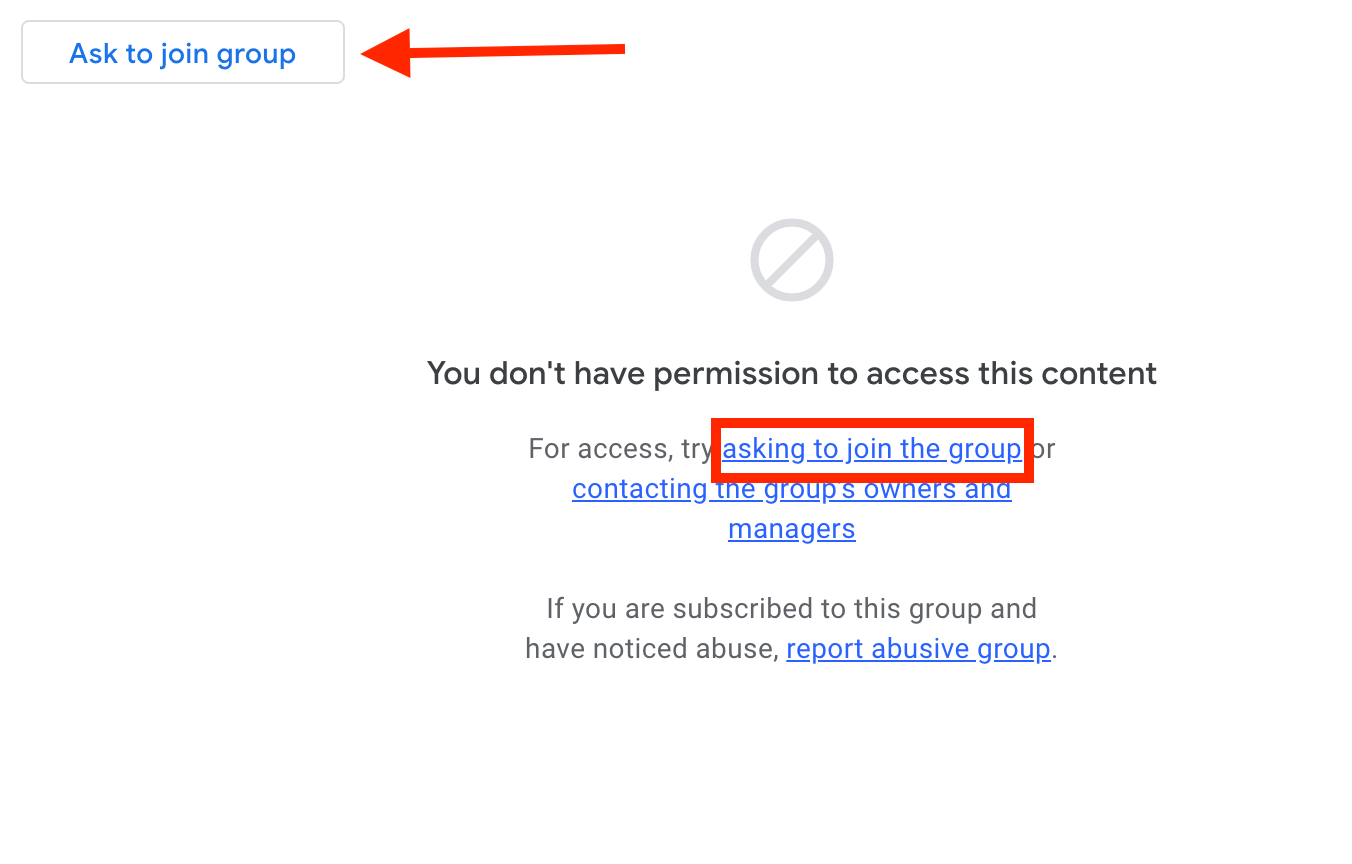
    Access to LibreChat is determined by membership in the Google Group “its-librechat-users”

    1. Go to the Google Group “its-librechat-users”. If you can already view messages, you’re a member and no further action is needed.
    2. If not, click “ask to join the groupGoogle groups screen with arrow pointing to "ask to join group" and box around "asking to join the group"
    3. Once approved, you’ll receive a confirmation email. Access to LibreChat will be granted approximately 30 minutes later. See the next section for login steps.

    Logging in:

    Support and Training

    Resources:

    • Model Suggestions by Task: Based on feedback from other higher education institutions, these are recommended starting points for common tasks. Explore the options and choose whichever model might be most helpful for your specific needs. (Current as of June 9, 2025)

    LibreChat User Interface Guide 

    1. Getting Started
      • Important URLs and Resource URLs 
    2. Main Interface Overview
      • Screen Captures and Explanations of LibreChat Functionality 
    3. New Version Features for Chat Window
      • Highlights of New Features. 
    4. Current LLM Options
      • A list and description of all our available LLMs within our LibreChat environment. 
    5. Prompts
      • The Prompts Feature allows you to create, manage, and reuse standardized prompts with variables. 
    6. Memories
      • Memories are designed to help users manage and organize important information across chats to create a persistent knowledge base. 
    7. Parameters
      • List of all Parameters for each LLM available 
    8. Bookmarks
      • Allows users to save specific conversations or messages for quick access. 
    9. Presets – (DEPRECATED)
      • Pre-configured conversation templates that allow users to save and reuse specific combinations of Ai model settings, system prompts, and conversation parameters. 
    10. Share / Export Conversation
      • Allows users to generate a unique, view-only link to a chat, enabling them to collaborate, share prompts, get feedback, or report issues with others who don’t have direct access to their Chat instance. 
    11. Add Multi-Conversations
      • Allows you to engage multiple AI models or assistants simultaneously in a single conversation thread. 
    12. Temporary Chat
      • provides users with a way to engage in conversations that are not saved or stored, ensuring privacy and confidentiality. 
    13. Attach Files
      • allows users to upload and share files directly within chat sessions. 
    14. Tools (Chat Window)
      • Review of the current Tools installed within each Chat conversation. 
    15. LibreChat Mic / Speech
      • This feature provides a hands-free, convenient way to communicate, making interactions more natural and accessible. 
    16. Agent Builder
      • Allows users to create custom AI agents tailored to specific tasks or domains.
    17. Conversation Fork Options
      • The Fork feature essentially gives you version control for conversations, allowing you to branch, experiment, and maintain multiple conversation threads while preserving your work history 
    18. Feedback Icons
      • These icons provide a simple and intuitive way for users to give feedback on the quality and relevance of the Ai’s responses, which will further train their LLM. 
    19. Assistant Builder
      • Assistants are tailored for specific tasks or domains, offering specialized conversational experiences beyond general chat interactions. 
    20. Advanced Configuration / Future Directions –  
      • Ai evolving beyond traditional conversational Ai, into a comprehensive platform that leverages cutting-edge technologies like Agentic Ai assistants and Model Context Protocol (MCP) servers. 


    Welcome to the University of Rhode Island (URI) community! Whether you’re a new student, a current student, faculty, staff, or a visitor, we are excited to introduce you to Rhody Connect, the all-in-one mobile app designed to enhance your experience at URI. Available for download on both Apple and Android devices, Rhody Connect brings a wealth of information and resources right to your fingertips. Let’s dive into some of its key features that are tailored for everyone at URI.

    Download and Install Rhody Connect

    Getting started with Rhody Connect is easy! Simply click on the appropriate link below to download the app directly to your mobile device:

    Upon opening Rhody Connect for the first time, you’ll be prompted to choose one of four user personas that best fit your role at URI.

    Choose Your Persona

    New Student

    Guiding You on the Rhode to Becoming a Ram If you’re an admitted or newly matriculated student, this persona is for you. It includes a complete toolkit designed to ease your transition into university life:

    • To-Do Lists: Stay on top of important tasks and deadlines with personalized, interactive checklists.
    • Campus Tours: Access both in-person and virtual tours to familiarize yourself with the campus.
    • Interactive Campus Map: Find buildings, departments, and parking information with ease, and use your device’s integrated wayfinding to get to where you want to be.
    • Welcome Day, Orientation, and O-Week Information: Get details on New Student events and create your personalized agendas to kickstart your journey at URI. Rhody Connect is the primary day-of resource for New Student events.

    Current Student

    Your Campus Companion For current students, this persona offers essential features to navigate and make the most of campus life:

    • Interactive Campus Map: Easily locate buildings and services and use your device’s integrated wayfinding to get to where you want to be.
    • Dining Menus: Check out what’s being served today in the dining halls.
    • Virtual ID Card: Access your ID card digitally, add funds to your Ram account, and see where the Ram Card is accepted.
    • Student and Staff Directories: Find contact information for peers and faculty.
    • Laundry Connect Integration: Monitor laundry machine availability and status.
    • Real-time Shuttle Tracking: View shuttle schedules, current locations, and arrival times.
    • Events Calendar: Stay updated on campus events and activities.
    • Customizable “My Menu”: Add your most-used links to the top of the menu.
    • Favorites: Create a Favorites menu with deep links to your most-used pages. Favorited data sources that support live snippets (for example, Transit and Dining Menus) now display real-time data for at-a-glance viewing.

    Faculty/Staff

    Supporting URI Employees This persona is tailored for URI employees, providing access to tools and resources to facilitate your work:

    • PeopleSoft: Access your HR and payroll information.
    • Brightspace: Access your course information.
    • Paystub RI: View and manage your paystubs.
    • Maintenance: Submit a Work Order Request form.

    Future updates will include password-protected features for enhanced functionality.

    Visitor

    Explore URI Whether you’re a first-time visitor or a returning alum, Rhody Connect helps you explore the campus and stay informed:

    • Why Choose URI: Learn about what makes URI so special, and where anything is possible.
    • Campus Services: Discover the services available to visitors.
    • Event Information: Learn about upcoming events and activities on campus.
    • Campus Exploration: Navigate the campus with ease and find points of interest.

    Collaboration Opportunities

    The Rhody Connect admins are looking to collaborate with administrative and academic departments through multiple channels:

    • Promote a Special Event: Feature a banner on the home page and optionally create an interactive module with event details, schedule, and/or registration.
    • Integrate Rhody Connect into Classwork: Use the platform as a tool for students to apply hands-on design and programming skills by creating new app modules.
    • Sponsor an Ideathon at URI: Host a 24-hour hackathon-style event challenging students to create mobile app ideas and prototypes. This can help students apply theoretical knowledge to real-world scenarios, develop entrepreneurial skills, and interact with real companies. For a success story, see The Ideathon: Sparking Innovation at the University of Houston.
    • The SEED Program – a Modo Labs Paid Internship: Learn more on LinkedIn.

    Comprehensive Information at Your Fingertips

    Rhody Connect is designed to provide the entire URI community with a full range of up-to-date information. Here’s a snapshot of what you can access:

    • Dining Menus: Plan your meals with up-to-date menus from campus dining facilities.
    • Maps: Navigate the campus effortlessly with interactive maps.
    • Calendars: Stay informed about important dates and events.
    • Visitor Information: Essential info for making the most of your visit to URI.
    • Transportation: Track shuttles and find transportation options.
    • eCampus Connect: Rhody Connect’s integration with PeopleSoft provides at-a-glance, widget-based information, as well as detailed screens that allow users to view and manage essential information.
    • Libraries: Access library resources and information.
    • Campus Directory: Find contact information for students, faculty, and staff.
    • Recreation: Discover recreational activities and facilities and register for classes.
    • Safety: Stay safe with quick access to emergency contacts and safety information, plus a comprehensive directory of wellbeing and support services available at URI.
    • Sports and Entertainment: Get the latest on Rhody Rams sports and entertainment events.
    • Admissions: Information for prospective students.
    • News: Stay updated with the latest news from URI.

    Stay Connected Your Way

    Rhody Connect provides a wide variety of opt-in channels for you to receive alerts and notifications on specific topics like dining updates, student employment, and more. Choose the channels that are important to you and opt-in to receive their messages.

    We Want Your Feedback

    If you have ideas for enhancements or improvements, or if you find a bug, contact the IT Innovation group via the App Support link at the bottom of the Rhody Connect home page or email urimobile@uri.edu.

    Download Rhody Connect today and start exploring all the features that make it an essential tool for navigating life at URI. Whether you’re joining us for the first time, continuing your journey, or visiting our beautiful campus, Rhody Connect is here to support you every step of the way.