From Ideas to Impact: A Collaborative AI Strategy Session with robot

On August 19, leaders from the University of Rhode Island—including senior administrators, IT professionals, and business unit representatives—gathered for a half-day strategy session focused on Artificial Intelligence (AI) and its role in advancing URI’s mission. The session, From Ideas to Impact, featured Mary Strain, Amazon Web Services (AWS) leader for AI and Machine Learning in Education. With over two decades of experience bridging technology and education, she helped spark a practical, forward-looking conversation.

Key highlights and outcomes

  • Shared vision: Participants connected AI opportunities directly to URI’s mission, identifying ways AI can enhance teaching, research, and operations—all while aligning with institutional values.
  • Real-world use cases: During collaborative working sessions, teams developed high-impact, URI-specific AI concepts—from increasing student engagement to strengthening data-informed decision-making.
  • Cross-campus collaboration: Faculty, staff, and administrators made new connections across disciplines, laying the groundwork for a unified AI strategy.

A shared realization

Attendees shared realizations that highlighted both the potential and the practicality of AI at URI. Learning from use cases at other institutions sparked creativity and confidence. Reflecting on URI’s own data—what it is and where it resides—emerged as a key first step in realizing long-term value.

Examples from the community

Participants shared examples of how AI is already creating value at URI:

  • One director shared how his team uses AI to convert customer conversations into functional requirement documents and automate standard documentation—saving hours of manual work.
  • A faculty researcher explained how AI tools help him write, verify, and refine code—accelerating research workflows.

Looking ahead

This session marks the beginning—not the end—of a campus-wide AI initiative. Grounded in shared insights and practical examples, it represents a key milestone in URI’s thoughtful approach to AI: collaborative, mission-aligned, and responsibly implemented. With clear priorities and growing engagement, URI is well positioned to turn ideas into measurable outcomes. The next steps will be shaped by our collective creativity, commitment, and action.


new application with icon of two people high fiving and a lightbulb above them

The ITS Innovation team collaborates with faculty and staff to develop and implement new applications that enhance student success and support university goals. From introducing cutting-edge classroom technologies to creating engaging mobile applications, the team is dedicated to delivering innovative technology solutions that meet the needs of today’s modern student.

ITS Innovation Team

Executive Lead

Karen Lokey

Technical Lead

Karen Lokey
karen_lokey@uri.edu

Support Team

ITS Innovation

Get Help

To learn more about the ITS Innovation team or to request a consultation for new application development, contact the ITS Service Desk.

To support learning outside of the classroom, URI has partnered with Instructure’s Parchment Digital Badges to provide digital badging for faculty, staff, and students. Digital badges are web-enabled credentials that recognize achievements, content mastery, or new skills through non-academic micro-credentialing. These badges contain rich metadata that validates and verifies the learning outcomes they represent, offering a secure and portable way to showcase accomplishments.

Executive Lead

Karen Lokey

Technical Lead

Catherine White
cathywhite@uri.edu

Support Team

ITS Innovation

About the Service:

Features

  • Metadata-Rich Badges: Includes issuer details, criteria, evidence, associated standards, and expiration dates.
  • Real-Time Verification: Ensures credentials cannot be tampered with and are instantly verifiable.
  • Parchment Digital Badges Pathways: Design stackable, cross-disciplinary learning pathways incorporating prior assessments and external certifications.
  • Digital Backpack: Provides a free, secure space to share badges via LinkedIn, social media, email signatures, and resumes.
  • Employer Integration: Offers immediate access for employers to validate skills and accomplishments.

Access

Issuer Accounts:

  • URI departments can request accounts for non-academic credentialing.
  • Email the ITS Service Desk to set up an issuer account.

Digital Badges:

  • Badges are issued after participants meet specific learning outcomes or demonstrate mastery of skills.
  • Use Parchment Digital Badges for creating and issuing badges.

Explore Tools:

Visit the Parchment Digital Badges and URI’s Digital Badging Homepage to learn more.

Support & Training

Resources:

    For questions about digital badging or to request a consultation, contact the ITS Service Desk or the ITS Innovation team.

    LibreChat Logo

    LibreChat is a pilot program making generative AI easy and accessible for the URI community. Whether you’re brainstorming, creating content, or simplifying tasks, LibreChat brings powerful AI tools together in one easy-to-use platform.

    You can choose from a variety of large language models – tailored for everything from creative projects to data analysis to idea exploration.

    Want to try LibreChat? If you’re not already enrolled, you can request access using the steps outlined in the Access tab on this page. By using this service, you agree to the Terms of Use.

    Executive Lead

    Karen Lokey

    Technical Lead

    Chi Shen
    cshen@uri.edu

    Support Team

    ITS Innovation

    About the Service:

    Features

    • Easy to Use: The platform is designed to be simple and straightforward, so anyone can start using generative AI without needing technical skills.
    • Multiple AI Options: You can pick from different top AI tools, like those from OpenAI, depending on what you need—whether it’s writing help, creativity, or research.
    • Personalized Experience: Adjust settings and add features to make LibreChat work the way you want.

    Access

    Note: Use of LibreChat requires acceptance of the Terms of Use. Please review the terms before requesting access.

    Request access:

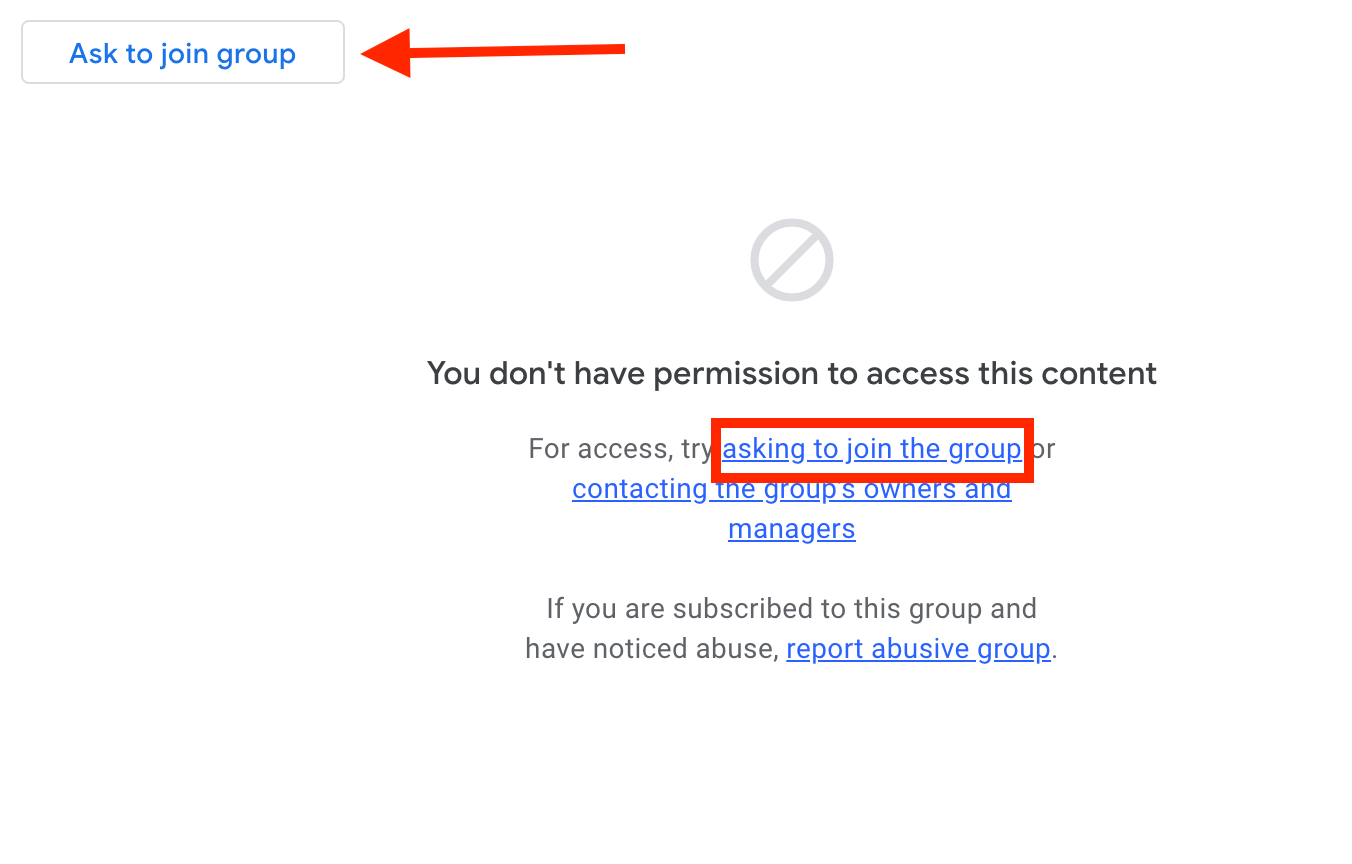
    Access to LibreChat is determined by membership in the Google Group “its-librechat-users”

    1. Go to the Google Group “its-librechat-users”. If you can already view messages, you’re a member and no further action is needed.
    2. If not, click “ask to join the groupGoogle groups screen with arrow pointing to "ask to join group" and box around "asking to join the group"
    3. Once approved, you’ll receive a confirmation email. Access to LibreChat will be granted approximately 30 minutes later. See the next section for login steps.

    Logging in:

    Support and Training

    Resources:

    • Model Suggestions by Task: Based on feedback from other higher education institutions, these are recommended starting points for common tasks. Explore the options and choose whichever model might be most helpful for your specific needs. (Current as of June 9, 2025)

    LibreChat User Interface Guide 

    1. Getting Started
      • Important URLs and Resource URLs 
    2. Main Interface Overview
      • Screen Captures and Explanations of LibreChat Functionality 
    3. New Version Features for Chat Window
      • Highlights of New Features. 
    4. Current LLM Options
      • A list and description of all our available LLMs within our LibreChat environment. 
    5. Prompts
      • The Prompts Feature allows you to create, manage, and reuse standardized prompts with variables. 
    6. Memories
      • Memories are designed to help users manage and organize important information across chats to create a persistent knowledge base. 
    7. Parameters
      • List of all Parameters for each LLM available 
    8. Bookmarks
      • Allows users to save specific conversations or messages for quick access. 
    9. Presets – (DEPRECATED)
      • Pre-configured conversation templates that allow users to save and reuse specific combinations of Ai model settings, system prompts, and conversation parameters. 
    10. Share / Export Conversation
      • Allows users to generate a unique, view-only link to a chat, enabling them to collaborate, share prompts, get feedback, or report issues with others who don’t have direct access to their Chat instance. 
    11. Add Multi-Conversations
      • Allows you to engage multiple AI models or assistants simultaneously in a single conversation thread. 
    12. Temporary Chat
      • provides users with a way to engage in conversations that are not saved or stored, ensuring privacy and confidentiality. 
    13. Attach Files
      • allows users to upload and share files directly within chat sessions. 
    14. Tools (Chat Window)
      • Review of the current Tools installed within each Chat conversation. 
    15. LibreChat Mic / Speech
      • This feature provides a hands-free, convenient way to communicate, making interactions more natural and accessible. 
    16. Agent Builder
      • Allows users to create custom AI agents tailored to specific tasks or domains.
    17. Conversation Fork Options
      • The Fork feature essentially gives you version control for conversations, allowing you to branch, experiment, and maintain multiple conversation threads while preserving your work history 
    18. Feedback Icons
      • These icons provide a simple and intuitive way for users to give feedback on the quality and relevance of the Ai’s responses, which will further train their LLM. 
    19. Assistant Builder
      • Assistants are tailored for specific tasks or domains, offering specialized conversational experiences beyond general chat interactions. 
    20. Advanced Configuration / Future Directions –  
      • Ai evolving beyond traditional conversational Ai, into a comprehensive platform that leverages cutting-edge technologies like Agentic Ai assistants and Model Context Protocol (MCP) servers. 


    EDUCAUSE is a nonprofit association that supports those who lead, manage, deploy, and use information technology at every level within higher education.

    As an EDUCAUSE member organization, staff across our organization have access to EDUCAUSE member benefits.

    Executive Lead

    Karen Lokey

    Technical Lead

    Karen Lokey

    Support Team

    ITS Innovation

    About the Service:

    Features

    Benefits of EDUCAUSE membership include:

    Research, Publications, and Analytics Services:
    Access to cutting-edge research, data, analytics, and benchmarking services, toolkits, and publications on issues, technologies, and trends in higher education.

    Professional Development:
    Management and leadership skills training through the EDUCAUSE Institute and peer mentoring, as well as volunteer opportunities to contribute to the profession. Special pricing is available for all programs and services, including registration for online and face-to-face events on a wide range of topics such as enterprise IT, information security, teaching and learning, and more.

    Topic-Based Communities:
    Opportunities to make connections with peers from around the world through topic-based events and online communities.

    Access

    Walk Through: How to Apply for an EDUCAUSE login

    How to Get the Most Out of EDUCAUSE Membership

    Follow the steps below to learn how to maximize your benefits:

    1. Create an EDUCAUSE Profile or log in:
      Create a profile to help tailor your member experience to your interests. Keep your profile up-to-date to be alerted of relevant resources and developments.
    2. Explore EDUCAUSE Membership Orientation:
      Discover some of the top tools and most popular resources EDUCAUSE members are using—curated for your area of interest.
    3. Join online community groups:
      These member-driven peer groups are perfect for sharing your ideas and expertise, finding solutions to pressing issues you’re facing, and exploring common interests.

    Support & Training

    Submit a ticket or attend a drop-in to report bugs or errors.

    Learn More: