
Overview
Brightspace now separates Project Sites from Administrative Sites to support FERPA compliance and accreditation requirements. If you need learners enrolled in a (non-credit bearing) site, you’ll need to request an Administrative Site using the process outlined on this page.
Faculty can still create as many Project Sites as needed and invite other faculty and staff to collaborate while developing courses. However, learners cannot be enrolled in Project Sites.
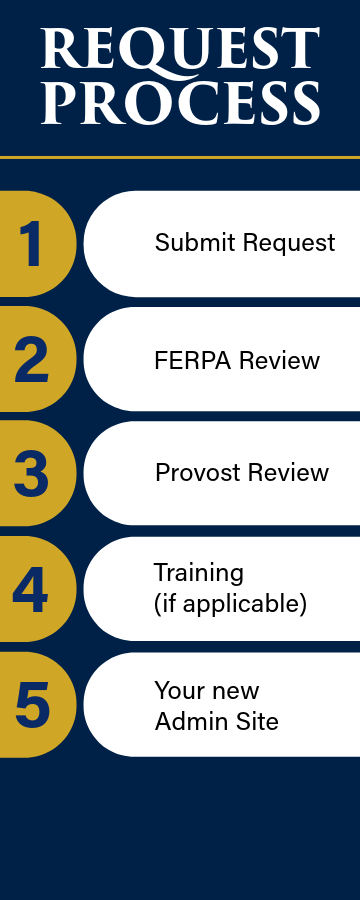
All admin sites will undergo a request and review process prior to creation or migration. The review process includes a review for compliance with the Family Educational Rights and Privacy Act (FERPA) and approval from the Provost’s Office.
To begin the request process, please refer to the request form linked to the right. There you will also find quick links to related online support articles.
Who should use this page?
- Faculty requesting training sites
- Staff supporting special programs
- Colleges, Academic, and Administrative departments
- Anyone requesting learner enrollments outside of a standard course shell
Before you submit
Before you submit a request, ask yourself:
- Do learners need to be enrolled in this site?
- Would a Project Site meet your needs instead?
- Is this site intended for training or another administrative purpose?
Request Directions & Resources
Submit a Brightspace Admin Site Request Admin Site Online Support Article Admin Site Roles Online Support Article Brightspace Roles Online Support ArticleAdmin Site Request Process
Every request follows the same five-step review process, shown below.

Ask Questions & Get Help
Visit us: Robert L. Carothers Library and Learning Commons, Room 227, Monday-Friday, 8:30a.m – 4:30p.m.
Join us online: TLS hosts a daily Zoom drop in session
Need help anytime? Submit a Service Now ticket